Hi Simplenoters! We’re excited to announce the beta release of our Simplenote MCP Server.
With it, you can easily use your favorite, MCP-compatible AI tool (Claude, Codex, etc) to search your Simplenotes using natural language.
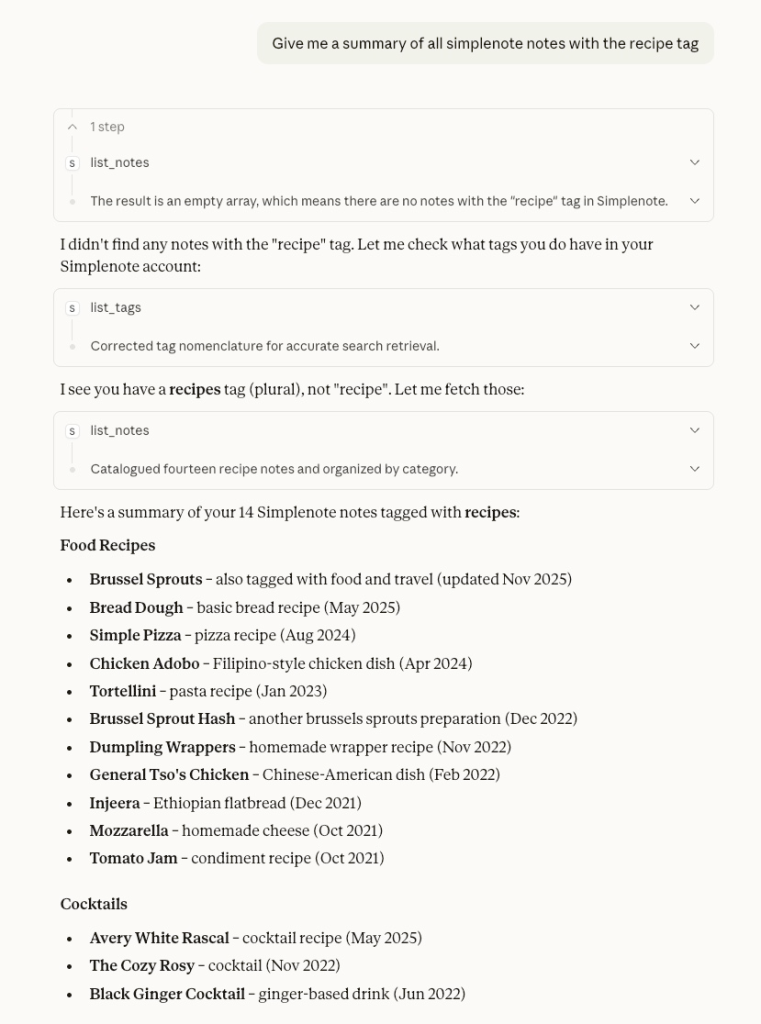
Here’s a small example of it in action:
How does it work?
The MCP server exposes a number of new tools that your LLM can use to parse Simplenote data:
list_tags: Lists all the tags in your Simplenote database.list_notes: Lists recent notes and can be filtered by tag.search_notes: Search notes by content, title, or tags.get_note: Get the full content of a specific note.
With that data, you can ask your LLM things like:
- “List my Simplenote tags”
- “Show my recent notes”
- “Search my notes for ‘recipe'”
- “Show notes tagged ‘ideas'”
- “Get the full content of note [id]”
Get it here
The latest version can be downloaded here as well as instructions for configuring the tool.
https://github.com/Automattic/simplenote-mcp
Notes
- This version currently only supports macOS and needs to be manually installed into your LLM. See the “Get it here” link for example installation instructions. Windows support will be available in the near future.
- The MCP reads directly from Simplenote’s local data. It’s read-only and doesn’t modify your notes.


One thought on “Simplenote MCP Server”
Comments are closed.